Local Pack, Local Listings, and Ad Placement for Schools: The Complete Guide
When a parent searches for a school in your area, the results they see in the first few seconds determine whether your school is even in the conversation. Before they scroll, before they visit your website, before they read a single word you have written, Google has already decided how prominently to display you and where.
The local pack, your local listings, and the ad placements above the organic results together control that first impression. Schools that understand how these three elements work, and how to optimize for all of them, consistently outperform competitors who focus only on their website or only on paid advertising. This guide covers all three in practical terms.
Kreative Webworks
- Updated 2026 · ~2,300 words · 7 min read
IN THIS GUIDE
1. What the local pack is and why it matters for schools
2. How to get your school into the local pack
3. Local listings: building the directory footprint that supports local search
4. Ad placement strategies for schools
5. Combining local SEO and paid ads for full search page coverage
6. Online reputation management and its role in local search
7. Measuring local search and ad performance
See how Kreative Webworks runs local SEO and paid search programs for charter and private schools
School digital marketing service
What the Local Pack Is and Why It Matters for Schools
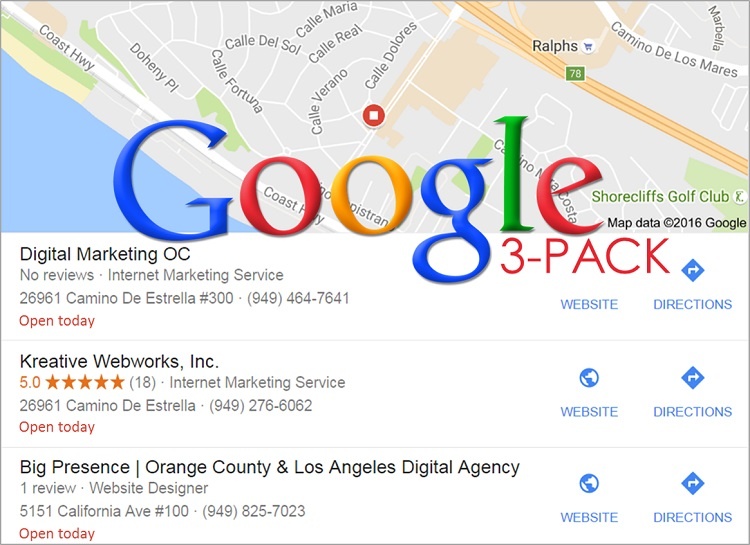
The local pack is the block of three business listings that appears near the top of a Google search results page when someone searches for a local service. It shows a map, three business names, their star ratings, addresses, and contact details. For a search like "charter school near me" or "private school in [city name]," that local pack is often the first thing a family sees, sitting above the standard organic results and sometimes even above paid ads.
Appearing in the local pack is not the same as ranking in organic search. It draws from a separate algorithm that weights your Google
Business Profile, your local listing consistency, your review volume, and your proximity to the searcher. A school with a strong website but
a neglected Google Business Profile can rank well organically and still be invisible in the local pack.

"The local pack is prime real estate. It appears before organic results on most searches. If your school is not in it, a competitor almost certainly is."
Kreative Webworks
For schools, local pack visibility is particularly valuable because the intent behind local school searches is almost always at the decision stage. Families searching for a school in their area are not doing casual research. They are actively looking for options. Appearing prominently at that moment directly affects the number of enrollment inquiries your school receives.
How to Get Your School Into the Local Pack
Local pack placement is driven primarily by three factors: relevance (does your profile match the search query), distance (how close is your school to the searcher), and prominence (how well-known and trusted is your school online)? Of the three, prominence is the one you can influence most directly through consistent effort.
Claim and fully complete your Google Business Profile
Your Google Business Profile, formerly Google My Business, is the single most important element of local pack performance. A profile that is claimed, verified, and fully completed significantly outperforms one that is incomplete or claimed by nobody at all. Every field matters: school name, address, phone number, website, opening hours, school category, description, photos, and attributes.
Use your exact legal school name. Do not add keywords to your business name. Google treats this as spam, and it can result in suspension. Your address must match exactly what appears on your website and across all your local listings.
Post regularly to your Google Business Profile
Google Business Profile supports posts, which are short updates that appear on your profile and, in some cases, in search results directly. Schools that post weekly updates about events, open houses, enrollment periods, and program highlights signal to Google that their profile is actively managed. This consistency factor contributes to local pack ranking over time.
Build review volume systematically
Star ratings and review count are visible in the local pack listing itself, which means they influence click-through rates as much as they
influence ranking. Schools with fifteen or more recent, detailed reviews consistently outperform those with three or four older ones in both
click rates and local ranking. Ask satisfied families to leave a Google review. Make it easy by sending a direct link. Respond to every
review, positive or negative, professionally.
PRACTICAL TIP
Never offer incentives for reviews. Google prohibits this and can remove reviews or penalize your profile if it detects a pattern. Simply
ask families at a natural high point, such as after a successful open house, at the start of a new school year, or following a positive
event.
Ensure NAP consistency across the web
NAP stands for Name, Address, and Phone number. Every place your school appears online, including your website, social profiles, local directories, and education listing sites, should show exactly the same NAP data. Inconsistencies confuse search engines and reduce your local ranking authority. A school that appears as "Westside Charter School" on Google, "Westside Charter" on Yelp, and "West Side Charter Academy" on a directory site has a NAP consistency problem that directly hurts local pack performance.
Local Listings: Building the Directory Footprint That Supports Local Search
Local listings are the citations that appear about your school across the wider web, including education directories, local business directories, review platforms, mapping services, and social platforms. They serve two purposes: they are direct traffic sources in their own right, and they build the local authority signals that support your Google local pack ranking.
Which directories matter most for schools
Not all directories carry equal weight. Prioritize the platforms that are most likely to be used by families researching schools and that carry the most authority with search engines.
| Platform / Directory |
Why it matters for schools |
| Google Business Profile |
Primary driver of local pack visibility. The single most important listing to get right. |
| Apple Maps |
Significant share of mobile searches from iOS devices. Claim via Apple Business Connect. |
| Bing Places |
Smaller share but still meaningful, especially for older demographics. Free to claim. |
| GreatSchools.org |
One of the first results families see when searching school reviews. High domain authority. |
| Niche.com |
Popular school research tool for families. Reviews and ratings carry weight in decision-making. |
| Facebook Business Page |
High authority, frequently indexed by Google. Reviews visible in search results. |
| Local chamber of commerce |
Local authority signal. Relevant if your school participates in the local business community. |
| Yelp |
Less central for schools than for businesses, but worth claiming to manage reviews. |
| US News / SchoolDigger |
Used by families comparing schools on academic metrics. Keep data current. |
Audit your existing listings before building new ones
Before creating new directory listings, audit what already exists for your school. Many schools discover they have duplicate, incomplete, or
incorrect listings that have been created automatically by data aggregators. Tools like BrightLocal or Moz Local can surface these quickly.
Correct or remove duplicates before adding new citations; otherwise you create more NAP inconsistency rather than less.

Ad Placement Strategies for Schools
Paid ad placements appear above the local pack and above organic results on most school-related search queries. For schools that are not yet ranking organically or in the local pack, paid search is the fastest way to achieve visibility. For schools that are already ranking well, ads provide additional coverage and allow you to dominate the most valuable search queries.
Search ads (Google Ads)
Text-based search ads that appear at the top of results pages for specific keyword queries are the most direct form of paid school marketing. They capture high-intent searches, specifically families who have already decided to look for a school and are actively comparing options. A well-structured Google Ads campaign for a school typically targets variations of location-based queries, school type searches, and program-specific terms.
Ad spend of $400 to $700 per month per campaign is a widely cited starting point for school-level paid search, with management fees of $500 to $1,500 per month on top. During open enrollment periods, increasing the daily budget and concentrating spend on your highest-converting keywords is usually worth the additional investment.
Display and remarketing ads
Display ads appear across the Google Display Network, including websites, apps, and YouTube. For schools, display advertising is most effective as a remarketing tool rather than a prospecting tool. Families who have already visited your website and not yet made an inquiry are a high-value audience to re-engage with a well-timed display campaign. Remarketing costs significantly less than prospecting and typically produces stronger conversion rates.
Performance Max campaigns
Google's Performance Max campaign type runs ads across all Google channels, including Search, Display, YouTube, Gmail, and Maps, using a
single campaign setup. For schools with limited time to manage multiple campaigns, Performance Max can be an efficient way to maintain
cross-channel visibility. It requires clear conversion tracking to perform well; without it, the algorithm optimizes for the wrong signals.
WATCH OUT
Broad keyword targeting in school search campaigns wastes budget quickly. Queries like "school" or "education" attract searchers who are not looking for local enrollment options. Use geo-targeting, phrase match, and negative keyword lists from the start. A poorly structured campaign can spend its entire daily budget on irrelevant clicks before a relevant family ever sees your ad.
Ad copy that connects with families
School ad copy needs to do two things: confirm relevance (yes, this is a local school option for your child) and create a reason to click (here is what makes us different). Generic copy that says nothing specific about your school performs significantly worse than copy that references your location, your school type, a specific program, or a direct call to action like "Open Enrollment Now" or "Book a School Tour."

Combining Local SEO and Paid Ads for Full Search Page Coverage
The most effective approach to school search marketing is not a choice between organic local SEO and paid advertising. It is running both simultaneously so that your school appears in multiple positions on the same results page.
When a family searches for a school in your area, a school that appears in the paid ads at the top, in the local pack in the middle, and in the organic results below creates a strong impression of presence and credibility, even if the family clicks only one of those results. Visibility across multiple positions on the same page consistently lifts click-through rates for all of them.
| Running only paid ads |
Running local SEO + paid ads together |
| Visibility stops when ad spend stops |
Organic and local rankings persist independent of ad budget |
| High ongoing cost per click in competitive markets |
SEO reduces cost-per-acquisition over time as organic traffic grows |
| Single position on the results page |
Multiple positions create a dominant presence on high-intent queries |
| No trust signals from local reviews or organic ranking |
Reviews, local pack, and organic results all reinforce credibility |
| Weak performance outside peak ad periods |
Consistent visibility year-round regardless of enrollment season |
Learn how Kreative Webworks approaches search engine optimization and local search for schools
SEO for schools
Online Reputation Management and Its Role in Local Search
Your school's star rating and review content are visible before a family clicks anything. In the local pack, ratings appear directly next to
your school name. In search results, rich snippets can surface your rating on the results page itself. A school with a 4.8-star rating and
forty reviews projects a very different impression than one with a 3.2-star rating and six reviews, even before anyone visits the site.
Monitor mentions and reviews across platforms
Set up Google Alerts for your school name and relevant variations. Check your reviews on Google, Facebook, GreatSchools, and Niche monthly. Negative reviews that go unanswered signal to both prospective families and to Google that the school is unresponsive. A professional, empathetic response to a negative review can neutralize its impact and occasionally convert the reviewer.
Build a positive review profile over time
A consistent program of asking happy families for reviews, tied to natural positive touchpoints in the school year, is more sustainable and
more effective than sporadic pushes. Schools that build fifty or more genuine reviews over several years carry a local authority advantage
that is very difficult for a newer competitor to overcome quickly.
PRACTICAL TIP
Create a direct link to your Google review form and include it in your email signature, end-of-term parent newsletters, and open house follow-up emails. The easier you make it, the more reviews you will receive without having to ask repeatedly.
Measuring Local Search and Ad Performance
Every investment in local search visibility and paid placement should be tracked. Without measurement, you cannot tell which elements are working, which need adjustment, and whether your combined spend is generating enrollment inquiries at a sustainable cost.
What to track for local search
Google Business Profile Insights shows how many families found your profile through direct searches (searching your name) versus discovery searches (searching a category or keyword). Discovery searches are the more valuable metric; they indicate you are reaching families who did not already know your school existed. Track profile views, direction requests, website clicks, and phone calls from your profile on a monthly basis.
What to track for paid ads
Cost per click, cost per conversion, and conversion rate by campaign and keyword. A conversion should be defined as a meaningful action: a form submission, a phone call, or a tour booking, not just a page visit. Schools that measure only impressions and clicks are not measuring whether their ad spend is actually driving the enrollment pipeline.
Connecting the data
Both Google Business Profile and Google Ads feed into Google Analytics 4 when set up correctly. A school that connects all three has a single view of how families are finding them, what they do on the website after arriving, and which channels are producing real enrollment inquiries. That connected data set is what makes ongoing budget decisions rational rather than intuitive.
Find out where your school stands on local search, ad readiness, and website performanceFree website audit for schools